













































How to trigger SAP Cloud Platform Integration via Oauth in Postman
WRITTEN BY
Alisha Viz
10th June 2022
INTEGRATION
Introduction
Hi Guys!!! So this is my first technical blog post on SAP CPI. Hope you guys are going to like it.
As we know, Cloud Platform Integration (CPI) is SAP’s cloud middleware that allows blending between cloud and on-premise applications with third-party SAP and non-SAP products. Take it as given, I am assuming you are already familiar with CPI.
Till now, we have learnt about triggering postman using basic authorization. In this blog I am going to demonstrate triggering postman via OAUTH 2.0.
For more information on CPI, refer https://blogs.sap.com/2020/01/03/sap-cloud-platform-integration-cpi-part-1-know-your-tool/
Pre-Requisite:
- 1. SAP BTP cockpit account cloud foundry set up, refer this: https://help.sap.com/docs/BTP/65de2977205c403bbc107264b8eccf4b/9c7092c7b7ae4d49bc8ae35fdd0e0b18.html
2. Postman is Installed
Create a simple Sender Scenario (with HTTPS Sender Adapter)
The below figure shows the integration flow that you get as an outcome of this exercise.
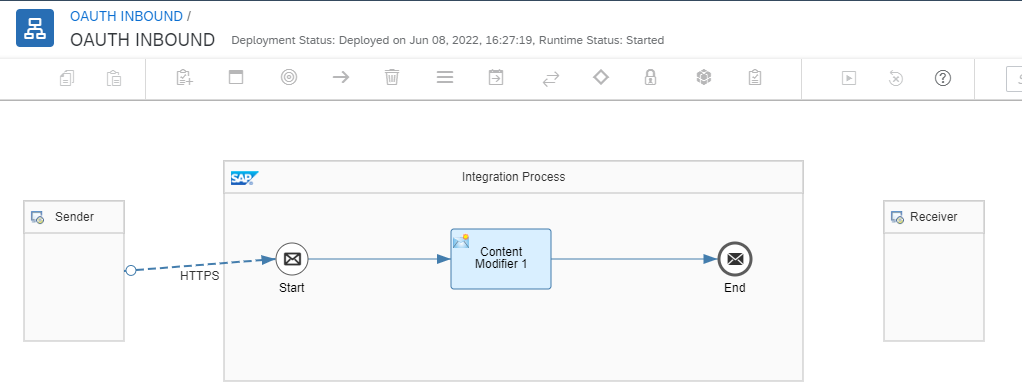
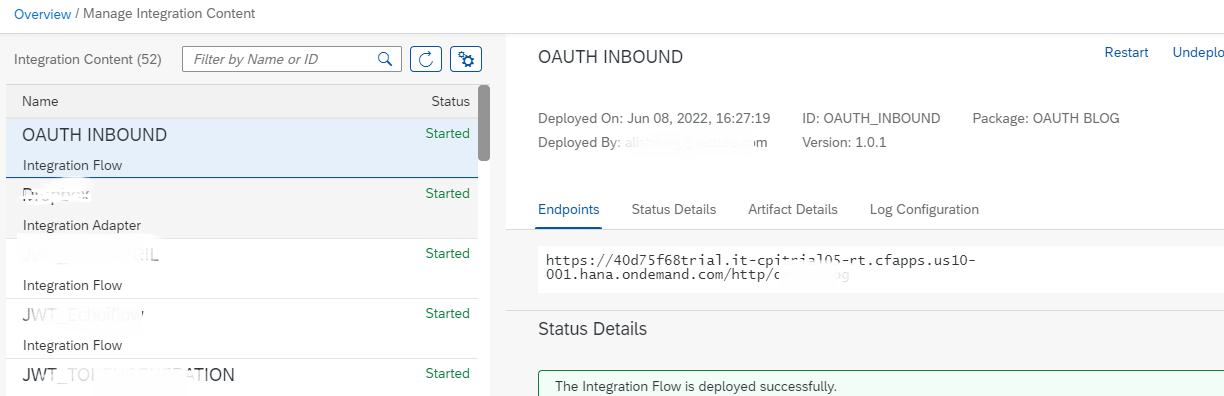
2. Refer to below screenshot, copy the end url and save it for later.
Navigate to SAP BTP Account/ Trial Account
- Logon to your SAP CPI Tenant
2. Navigate to Instances tab under Security
3. Service Instances and Keys are created at Cloud Foundry level when we set up our account. Navigate to your Cloud Foundry where Process Integration Runtime service keys has been created. In SAP Cloud Platform trial a default space named dev is automatically created when you will enable the trial environment.
4. Select View parameters from the icon with three vertical dots.

5. After clicking on View, you will find this type of service key on right hand side of screen, click on that.
6. Save that information confidentially in any notepad.
5. After clicking on View, you will find this type of service key on right hand side of screen, click on that.
6. Save that information confidentially in any notepad.

-
TESTING THE FLOW
For testing the above flow, I have used postman. You can use any other test console too.
1. Navigate to the postman app and click on the + sign on top.
2. Select the POST method.
3. Paste the CPI enpoint url in the link space.
4. Choose Oauth 2.0 from the authorization tab.
5. Refer to the image below

- 6. Now, when you choose oauth 2.0, you can find following details as shown below

- Give grant type = client credentials
- Paste the access token url
- Paste the client_id and client_secret that you already have from the service key.
- Click on Generate Access token
- Your authentication will be done and it will automatically generate and restore your token, click on send and you get your result.
Keep in mind
An OAuth token contains sensitive information. We also have a choice to share the token. As you can see the sync icon under authorization tab. By default they dont keep it in sync position. But the token is still restored in your session.

Conclusion: To summarise, we are triggering the SAP CPI artifact via Oauth instead of Basic authorization using Postman.
For more information refer: https://blog.postman.com/collaborating-oauth-postman/
Do like, share and comment if you found this helpful.
See you again….

How Does SAP Advanced Event Mesh Improve Real-Time Processing and Integration for Enterprises?
SAP Advanced Event Mesh (AEM) enables enterprises to build scalable, resilient, and real-time integration architectures across hybrid and multi-cloud environments. As part of the SAP Integration Suite, AEM supports event-driven architectures by decoupling applications and enabling seamless publish–subscribe communication. This ensures uninterrupted business processes, faster event distribution, and greater agility, even during system outages or maintenance empowering organizations to respond intelligently to modern digital demands.

How Can Consumer Products Brands Use SAP BTP to Build a Trusted Data Foundation for Faster Product Launches?
Consumer product companies face intense competition, evolving consumer expectations, demand for personalization, and sustainability goals. To stay ahead, brands must deliver innovative products faster with precision. This requires a unified data foundation connecting design, manufacturing, supply chain, and marketing. When data is siloed, decisions slow and inconsistencies grow. With SAP BTP, brands can centralize data, enhance accuracy, and drive agility, enabling faster, more confident decisions and accelerating innovation across the consumer products value chain.
